
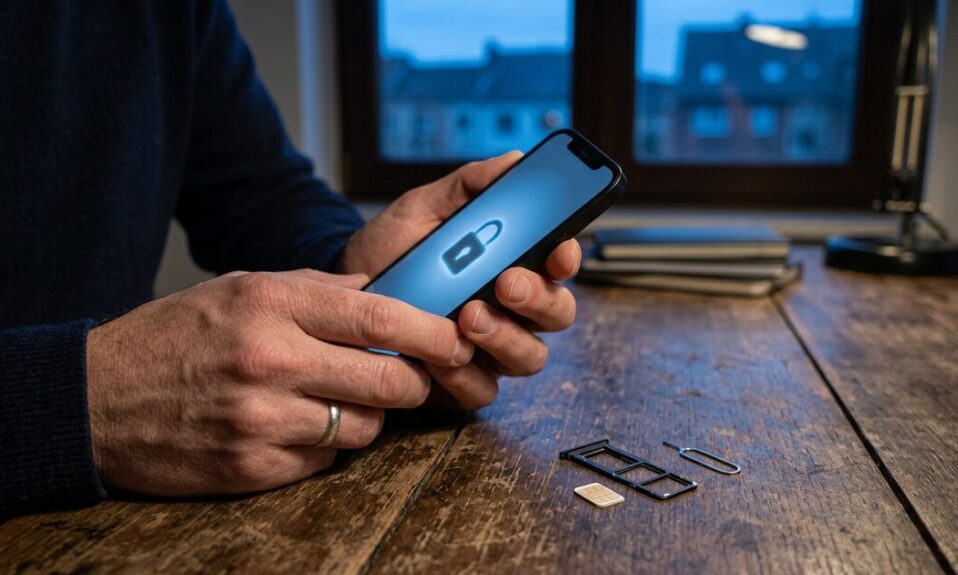
If you want to know how to prevent SIM swapping on Android or iPhone, start with three moves: ask your carrier for an account PIN or port-out lock, turn on your phone’s SIM PIN, and stop using SMS codes for your bank and email. Those three cover most of the risk. The rest of this guide explains why, shows the exact settings, and tells you what to do in the first hour if your signal suddenly vanishes.
I’ll be honest about one thing up front. No setting on your phone can fully stop a determined scammer from talking a carrier employee into moving your number. What you can do is make that much harder, and make a stolen number almost useless once it’s gone.
What SIM swapping actually is (in plain words)
Your phone number is not really “in” your phone. It lives on your carrier’s system, which points it at a SIM card or eSIM. A SIM swap happens when someone convinces the carrier to point your number at a SIM they control. A close cousin, port-out fraud, moves your number to a different carrier entirely.
No hacking skills needed. Usually it’s just impersonation: the fraudster already has your name, date of birth, maybe an ID number from some old data leak, and they call or walk into a store claiming they lost their phone.
The moment it works, your phone drops to “No service.” From then on, every SMS code your bank or email provider sends goes to them.
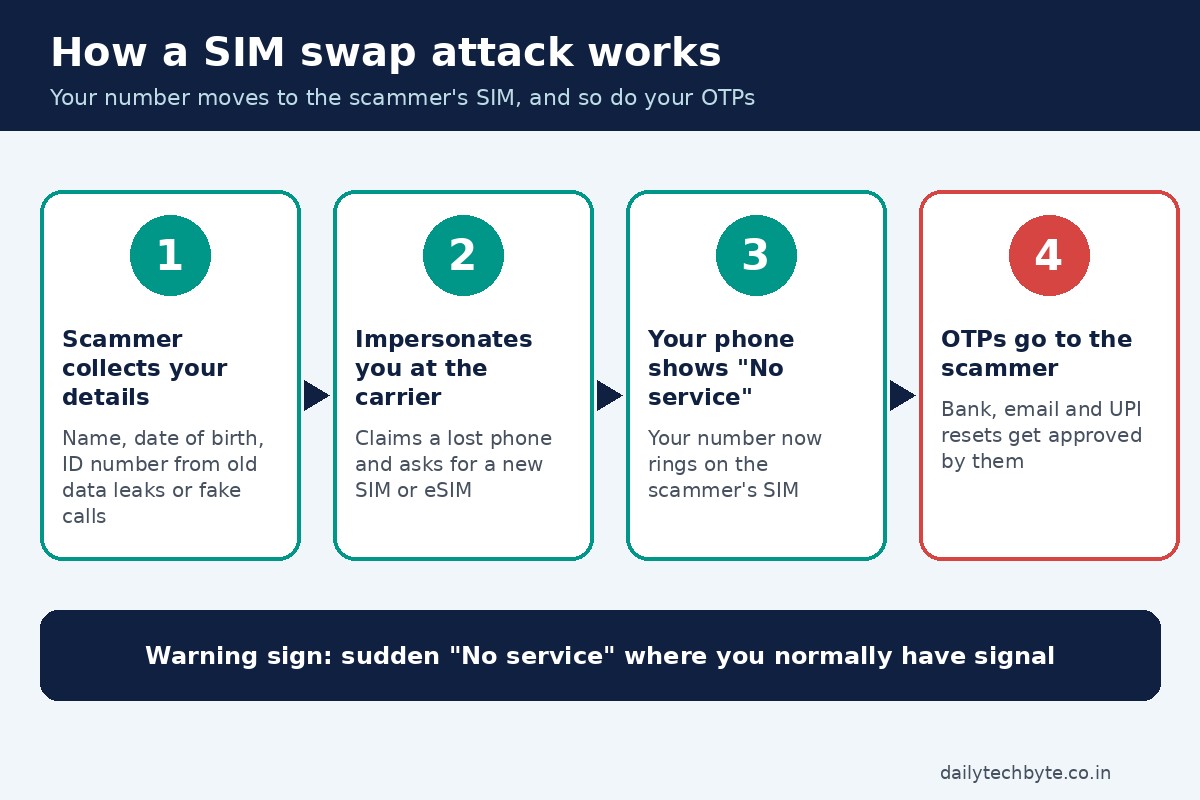
That’s the part people miss. The scammer doesn’t want your calls. They want your one-time passwords.
Why your number has become a master key
Think about how many accounts reset with a text message. Banking. Email. Social media. UPI and wallet apps. Your number quietly turned into the spare key under the doormat, and a SIM swap is someone copying that key.
How to prevent SIM swapping: the 6 steps I’d do today
Here’s the order I’d follow. The first three matter most, so if you only have ten minutes, do those.
1. Lock down your carrier account
Call your carrier or open its official app and ask for two things:
- An account PIN or passcode that must be given before any SIM change, number transfer or account edit.
- A port-out or number lock, if they offer one, so your number can’t be moved to another provider until you switch it off.
Also ask whether SIM replacements can be restricted to in-person requests with original ID. Not every carrier offers this, but it’s worth asking.
While you’re at it, secure the carrier’s own app login with a strong, unique password. Fraudsters sometimes break into that app first, quietly change the contact email or PIN, and then call support “as you” with details they just set themselves. Sneaky. Very effective.
2. Move your bank and email off SMS codes
This is the single most useful change, in my view. Many banking apps now let you approve logins and payments inside the app with your fingerprint or face, or with an in-app token. Look in your bank app under Security or Login settings and switch to that if it’s available.
For email, social media and payment apps, switch two-step verification from SMS to an authenticator app, a passkey, or a hardware security key. Those codes and keys live on your device, not on your phone number, so a swapped SIM can’t receive them.
Start with your main email. It’s the reset path for almost everything else, so if a scammer gets into it, they can often walk into the rest.
3. Turn on your SIM PIN
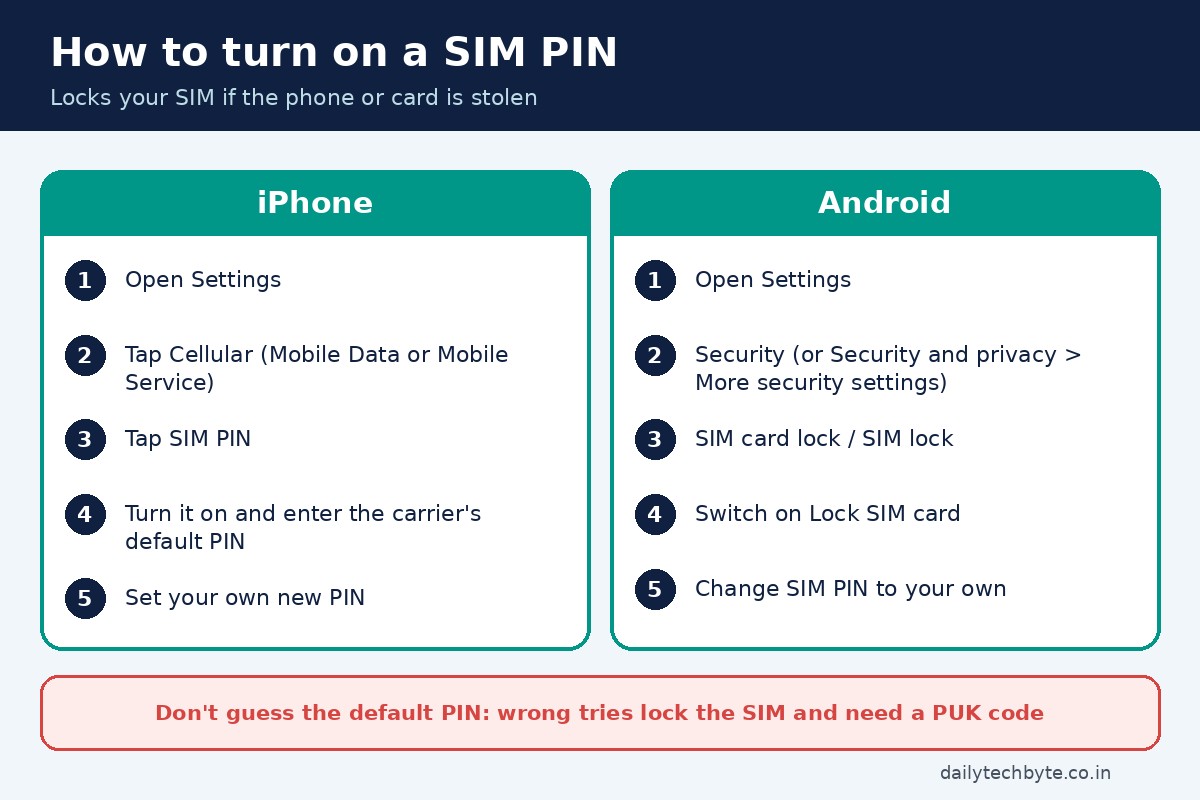
A SIM PIN locks the SIM card or eSIM itself. After a restart, or if someone pulls the card and puts it in another phone, it won’t connect until the PIN is entered.
On iPhone: go to Settings, then Cellular (called Mobile Data or Mobile Service in some regions), then SIM PIN, and turn it on. If you have two lines, tap the number first.
On Android: open Settings, then Security (on newer phones, Security and privacy, then More security settings), then SIM card lock or SIM lock, and switch on Lock SIM card. Menu names vary by brand, so search “SIM lock” in Settings if you can’t find it.
You’ll need your carrier’s default SIM PIN to set a new one. It’s usually on the card holder or the carrier’s help page. Please don’t guess. Too many wrong tries locks the SIM, and you’ll need a PUK code from the carrier, and too many wrong PUK tries can kill the SIM for good.
One honest caveat: a SIM PIN protects you if your phone is stolen. It does nothing against a scammer who fools the carrier into issuing a brand-new SIM. That’s why step 1 exists.
4. Shrink the personal data floating around
Fraudsters need your details before they can impersonate you. So stop handing them out. Never share your date of birth, ID numbers or OTPs with someone who calls claiming to be your bank, carrier or a government office. Real organizations don’t need you to read out a code they just sent.
Trim what’s public too. Birthdays on social profiles, your phone number on public pages, your full address on old forum accounts. Each one is a small piece of the puzzle.
5. Keep a backup way to reach help
Picture a nurse finishing a night shift who notices “No service” at 7 a.m. and assumes it’s a network glitch. A few hours later, the bank account is empty. Losing signal for no reason, in a place where you normally have it, is the warning sign. The trouble is that you can’t call your carrier from a dead phone.
So keep a plan B: your carrier’s support number and your bank’s fraud line saved somewhere other than your phone, Wi-Fi calling or a messaging app for emergencies, and ideally a second number from a family member you can borrow fast.
6. Turn on every alert you can
Switch on email and app notifications for logins, password changes and transactions on your bank, email and carrier accounts. Email alerts are useful precisely because they don’t depend on your SIM.
What each protection stops (and what it doesn’t)
| Protection | What it helps stop | What it won’t stop | Effort |
|---|---|---|---|
| Carrier account PIN or port-out lock | Someone moving your number by phone or in a store | An insider at the carrier who ignores the rules | One call or a few taps in the carrier app |
| In-app approval or authenticator app instead of SMS | Scammers using your stolen number to log in or approve payments | Phishing pages that trick you into approving a login yourself | 10 to 20 minutes per important account |
| SIM PIN | A thief using your physical SIM in another phone | A carrier issuing a new SIM to a scammer | Two minutes once you know the default PIN |
| Less personal data online | Easy impersonation at the carrier | Data already exposed in old leaks | Ongoing habit |
| Email and app alerts | Slow discovery of a takeover | The takeover itself | A few minutes |
Rules that already protect you (US and India)
Regulators have tightened things, which helps, but none of it replaces your own settings.
In the US, the FCC adopted rules in November 2023 requiring wireless carriers to use secure methods to authenticate customers before moving a number to a new device or provider, and to notify customers right away when a SIM change or port-out request is made. The rules also require carriers to offer customers a way to lock their accounts against these changes.
In India, SMS services (incoming and outgoing) are barred for 24 hours after a SIM replacement, which is why OTPs stop arriving for a day after a genuine swap. And under TRAI’s porting rules in force since July 1, 2024, a number can’t get a porting code until seven days have passed since a SIM swap or replacement.
So if you get an unexpected message saying a SIM change was requested on your number, treat it as urgent, not as spam.
What to do in the first hour if you think you’ve been SIM swapped
Speed matters more than anything here.
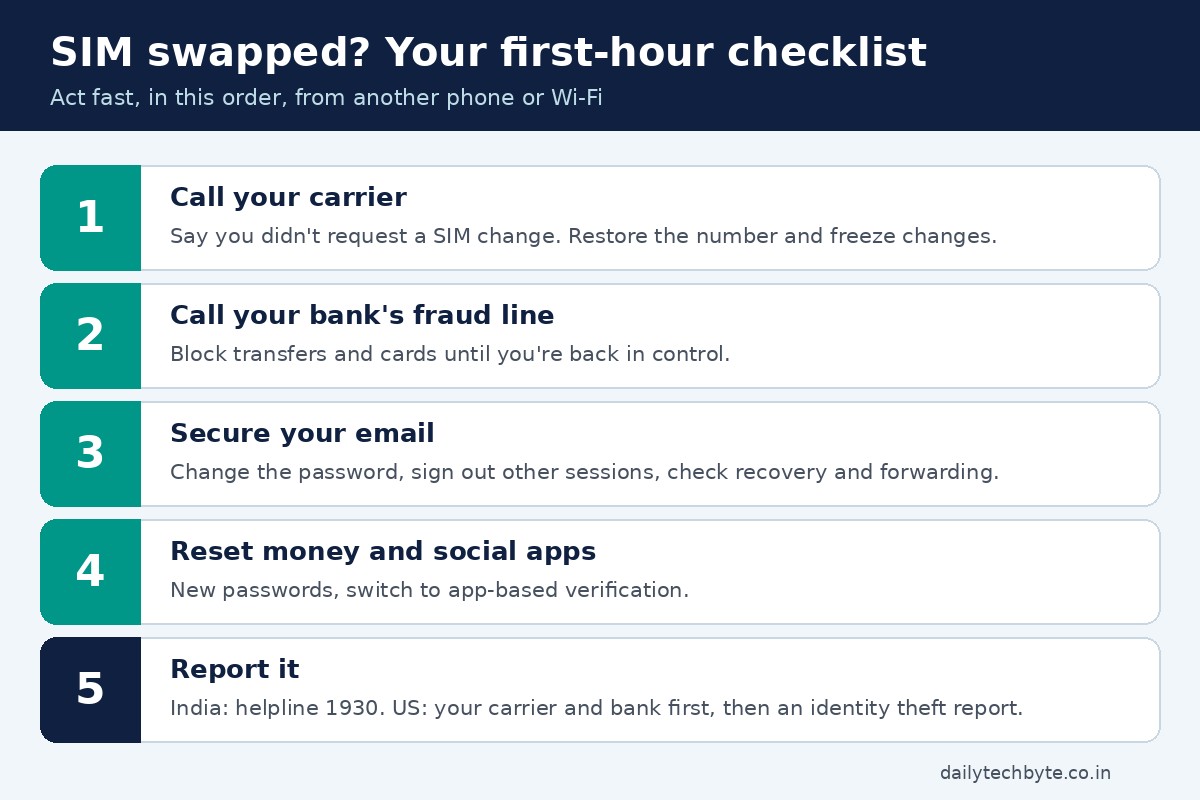
- Contact your carrier from another phone or Wi-Fi. Tell them you didn’t request a SIM change and ask them to restore your number and freeze changes.
- Call your bank’s fraud line and ask them to block transfers and cards while you sort it out.
- Change your email password from a trusted device, sign out all other sessions, and check recovery details and forwarding rules for anything you didn’t add.
- Work through your money apps and social accounts, resetting passwords and switching to app-based verification.
- Report it. In India, call the cyber crime helpline 1930 or file at cybercrime.gov.in, especially if money was taken. In the US, contact your carrier and bank first, then report identity theft at IdentityTheft.gov.
FAQ
Can SIM swapping happen if my phone is still in my hand?
Yes. That’s what makes it nasty. The swap happens on the carrier’s side, so your phone just shows “No service” while your number works on someone else’s SIM.
Does an eSIM stop SIM swapping?
Not fully. An eSIM can’t be pulled out of a stolen phone, which helps against physical theft. But a scammer can still ask the carrier to move your number to a new eSIM or SIM, so you still need a carrier PIN and app-based verification.
Does a SIM PIN prevent SIM swap fraud?
Only partly. A SIM PIN stops someone from using your physical SIM in another phone. It doesn’t stop a carrier from issuing a new SIM to a fraudster, so pair it with a carrier account PIN or port-out lock.
What is the first sign of a SIM swap?
Usually a sudden loss of signal (“No service” or “SOS only”) in a place where you normally have coverage, followed by password reset or login emails you didn’t trigger.
Why don’t I get OTPs for a day after changing my SIM in India?
Indian rules bar incoming and outgoing SMS for 24 hours after a SIM replacement. It’s a safety delay meant to stop fraudsters from using a freshly swapped SIM to grab OTPs.
Keep going
SIM security is really payment security in disguise, because most money apps still lean on your number. If you use wallet or payment apps, my guide on whether FamPay is safe to use walks through the safety checks I look for, and this older piece on payment app alternatives after the Paytm Payments Bank action is useful background on why it’s smart not to rely on a single app. And if you’re curious where mobile connectivity in India is heading, here’s my take on Starlink’s tie-ups with Jio and Airtel.
Set aside ten minutes today for steps 1 to 3. Future you will be glad you did.


